

Drag-and-Drop Editor: Customize AI Pages 50% Faster with 19 Components
FastifyAI's AI can generate stunning Shopify landing pages in just 30 seconds—but what happens when you need to tweak a headline, swap an image, or reorder sections to match your brand perfectly? That's where the magic of "click to edit" comes in. After AI generates your page, simply click to edit and access our intuitive drag-and-drop editor.
With 19 pre-built components at your fingertips and an intuitive visual interface, you can now customize your AI-generated pages 50% faster than traditional editing methods—no coding skills required. Simply generate your page with AI, click to edit, and start dragging components to perfect your design. Whether you're launching product pages, seasonal campaigns, or perfecting your brand message, our drag-and-drop editor makes professional page customization accessible to everyone.
✨ What You'll Gain with the Drag-and-Drop Editor
- ✓AI generates in 30 seconds, then click to edit instantly
- ✓50% faster editing compared to traditional page builders
- ✓19 professional components ready to drag and drop
- ✓Zero coding required—100% visual interface
- ✓Real-time preview of every change you make
The Challenge: Why AI-Generated Pages Need Customization
Let's be honest: even the most advanced AI doesn't know your brand like you do. While FastifyAI can generate professional landing pages in 30 seconds, every business has unique needs. Maybe you want to:
- Match your exact brand colors and voice to maintain consistency across your store
- Emphasize specific product benefits that resonate with your target audience
- Test different layouts and messaging to optimize conversion rates
- Add seasonal promotions or time-sensitive offers without starting from scratch
- Adjust for different product variants or collection pages
Traditional approaches to editing fall into two frustrating categories:
❌ Code-Based Editing: Requires HTML/CSS knowledge, time-consuming, and error-prone. One wrong character can break your entire page.
❌ Complex Page Builders: Steep learning curves, overwhelming interfaces, and still require significant time investment to achieve professional results.
That's why we built something different. Something that combines the speed of AI generation with the flexibility of visual editing—without any of the technical complexity.
19 Components at Your Fingertips
The heart of FastifyAI's drag-and-drop editor is our comprehensive library of 19 professionally designed components. Each one is pre-built, mobile-responsive, and optimized for conversions—ready to drag onto your page in seconds. After AI generates your initial page in 30 seconds, simply click to edit and start customizing with these powerful building blocks.
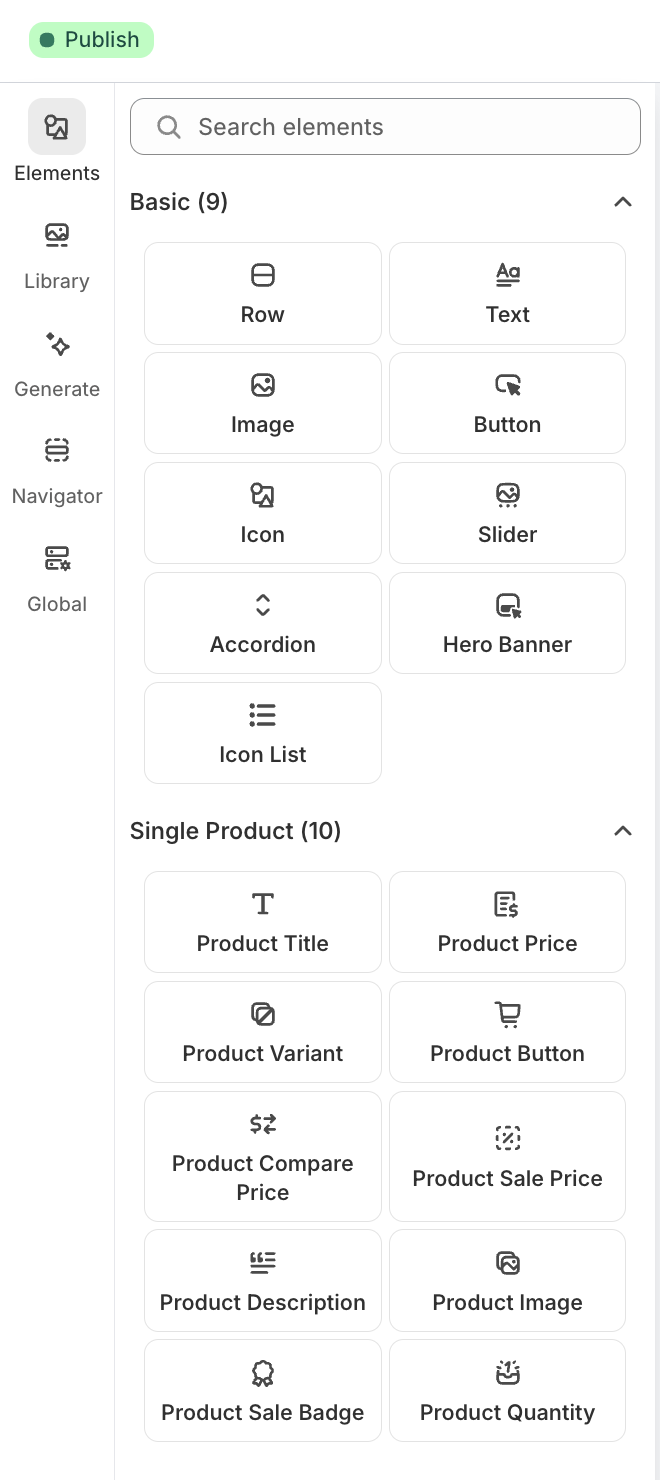
Complete library of 19 customizable components
Two Powerful Component Categories
📐 Basic Components (9)
Foundational building blocks for any page layout
- •Row - Flexible container for organizing content
- •Text - Formatted text blocks with styling
- •Image - Optimized image placement
- •Button - Customizable call-to-action buttons
- •Icon - Visual icons for emphasis
- •Slider - Image or content carousels
- •Accordion - Expandable FAQ sections
- •Hero Banner - Eye-catching page headers
- •Icon List - Feature lists with icons
🛍️ Product Components (10)
Shopify-specific elements for product pages
- •Product Title - Dynamic product name display
- •Product Price - Live pricing from Shopify
- •Product Variant - Size, color, option selectors
- •Product Button - Add to cart functionality
- •Product Price Compare - Original vs. sale price
- •Product Price Sale - Highlighted discount pricing
- •Product Description - Full product details
- •Product Image - Product photo gallery
- •Product Sale Badge - "On Sale" indicators
- •Product Quantity - Quantity selector
Every component is designed with best practices in mind—optimized spacing, mobile-responsive layouts, and conversion-focused design patterns. The combination of Basic and Product components gives you complete flexibility to build any type of landing page or product page you need.
Watch how easy it is to reorder sections with drag-and-drop
50% Faster Editing: How We Did It
Speed matters when you're running an eCommerce business. Every minute spent wrestling with page builders is a minute not spent on marketing, customer service, or product development. That's why we obsessed over making the editing experience as efficient as possible.
The Features That Make You Faster
1. Visual Drag-and-Drop Interface
No more hunting through menus or navigating complex settings panels. Simply grab any section of your page and drag it to where you want it. Reorder hero sections, swap testimonials and features, or move your CTA higher up the page—all with your mouse.
Time saved: What used to take 5-10 minutes of menu navigation now takes 10 seconds.
2. Click-to-Edit Text
See a headline you want to adjust? Just click it and start typing. No need to open editors, find the right field, or save changes. What you see is what you get, with real-time updates as you type.
Time saved: Edit multiple text blocks in seconds instead of minutes.
3. One-Click Image Replacement
Hover over any image, click the replace button, and choose from your media library or upload a new file. The system automatically optimizes and sizes the image for perfect display on all devices.
Time saved: No more manual image resizing or format conversion.
4. Real-Time Preview
Every change you make is instantly visible on the canvas. Switch between desktop, tablet, and mobile views to ensure your page looks perfect on all devices—without publishing and checking manually.
Time saved: Eliminate the publish-check-edit-republish cycle.
5. Instant Undo/Redo
Experimentation is risk-free with unlimited undo and redo. Try different layouts, test various component combinations, and revert instantly if something doesn't work. Your entire edit history is preserved.
Time saved: Explore creative options without fear of breaking your page.
Real Time Savings Breakdown
Traditional Page Builder:
- • Learn interface: 30-60 minutes
- • Build from scratch: 2-4 hours
- • Edit and refine: 30-60 minutes
- • Mobile optimization: 20-30 minutes
- Total: 3-6 hours
FastifyAI Workflow:
- • AI generation: 30 seconds
- • Drag-and-drop editing: 10-15 minutes
- • Component customization: 5-10 minutes
- • Preview all devices: 2 minutes
- Total: 15-30 minutes
Result: 50%+ faster plus significantly less learning curve
Real-World Use Cases: When Drag-and-Drop Shines
Here's how successful Shopify sellers are using the drag-and-drop editor to streamline their workflow and boost conversions:
1. Quick Brand Customization
Scenario: You've used AI to generate a landing page, but you need to match your brand's unique personality and visual identity.
Solution: Drag in your brand's hero section component, swap the AI-generated images with your professional product photos, adjust headlines to match your brand voice, and add your custom trust badges. The entire process takes 10-15 minutes instead of starting from a blank canvas.
Components used: Custom hero section, branded color scheme, logo cloud, custom testimonial cards
2. Seasonal Campaign Updates
Scenario: Black Friday is approaching, and you need to add countdown timers, special pricing, and urgent messaging to your product pages.
Solution: Drag a countdown timer component to the top of your page, add a promotional pricing table, and update CTAs with seasonal messaging—all in minutes. When the promotion ends, simply remove those components or swap them for the next campaign.
Components used: Countdown timer, promotional pricing table, urgency-focused CTA sections, seasonal hero banner
3. Product Variant Pages
Scenario: You sell the same product in different colors, sizes, or bundles, and need unique landing pages for each variation.
Solution: Generate one comprehensive product page with AI, then use drag-and-drop to create variants. Keep the structure consistent but swap product images, adjust feature callouts, and modify pricing tables for different variants. Maintain brand consistency while highlighting unique benefits of each option.
Result: Create 10 variant pages in the time it used to take to create 2
Best Practices & Pro Tips
To get the most out of FastifyAI's drag-and-drop editor, follow these proven strategies from top-performing Shopify sellers:
Start with AI, Refine with Components
Don't try to build everything from scratch. Let AI do the heavy lifting—generating content, selecting appropriate layouts, and creating a solid foundation. Then use the drag-and-drop editor to add your unique touches. This hybrid approach gives you the best of both worlds: speed and personalization.
Always Preview on Mobile
Over 70% of Shopify traffic comes from mobile devices. Use the built-in mobile preview constantly as you edit. What looks great on desktop might need adjustments for smaller screens. Fortunately, all 20+ components are mobile-optimized by default—you just need to verify the flow and spacing.
Maintain Visual Hierarchy
When dragging components around, think about the customer journey. Generally, successful pages follow this structure:
- Hero section with clear value proposition
- Social proof (testimonials, ratings, trust badges)
- Product features with benefits
- Additional proof points (case studies, before/after)
- FAQ section to overcome objections
- Strong CTA to drive action
Experiment with the order, but maintain a logical flow that guides visitors toward conversion.
Use Component Combinations Strategically
The 19 components are designed to work together. Try these high-converting combinations:
- Trust Builder: Hero section → Customer testimonials → Trust badges → Product features
- Benefit-Focused: Problem-aware hero → Icon benefit list → Before/after slider → Pricing table
- Social Proof Heavy: Hero → Stats display → Review carousel → Logo cloud → Feature grid
- Urgency-Driven: Promotional hero → Countdown timer → Limited stock indicator → Strong CTA
Keep It Concise
Just because you have 19 components doesn't mean you should use them all on every page. The best-converting pages are focused and scannable. Aim for 5-8 well-chosen sections rather than overwhelming visitors with too much information.
💡 Pro Tip: Save Your Best Layouts
When you create a page layout that converts well, save it as a template for future products. This way, you can replicate success across your entire product catalog while still customizing details for each item.
The Complete FastifyAI Workflow
Here's how the entire process comes together, from idea to published page:
Generate with AI (30 seconds)
Select your product, choose a page type, and describe what you want. FastifyAI's AI analyzes your product and generates a complete, professional landing page with optimized copy, relevant images, and strategic layout.
Click to Edit - Open Drag-and-Drop Editor
Click "Edit" to instantly open the visual drag-and-drop editor. The AI-generated page becomes your starting point, with every element ready to customize.
Customize with 19 Components (10-15 minutes)
Click "Edit" to open the visual editor. Drag sections to reorder, click to edit text, swap images, add components from the library, and adjust layouts. Work visually, see changes instantly, and iterate freely.
Preview Across Devices (2 minutes)
Toggle between desktop, tablet, and mobile views to ensure perfect display on all screen sizes. Make any final adjustments for optimal mobile experience.
Publish to Your Shopify Store (Instant)
One click publishes your customized page directly to your Shopify store. It's live immediately, fully optimized for speed and SEO.
Iterate and Optimize (Ongoing)
Monitor performance, gather customer feedback, and make updates anytime using the same drag-and-drop editor. Test variations, seasonal updates, and continuous improvements—all with the same fast workflow.
📊 The Bottom Line
From zero to published landing page: 15-30 minutes total
Compare this to traditional methods (3-6 hours) or hiring a developer (days or weeks), and the time savings become transformative. Create more pages, test more variations, and iterate faster than ever before—all while maintaining professional quality.
The FastifyAI Advantage: AI Speed Meets Human Creativity
What makes FastifyAI's approach unique is how we've combined two powerful capabilities that are rarely found together:
⚡ AI-Powered Speed
Generate complete, professional pages in 30 seconds. The AI handles content creation, image selection, layout decisions, and SEO optimization—giving you a strong foundation instantly.
🎨 Human-Centered Control
Customize every detail with an intuitive visual interface. 20+ components, drag-and-drop simplicity, and real-time editing let you infuse your brand personality and optimize for your specific audience.
This combination eliminates the traditional trade-off between speed and quality. You don't have to choose between:
- ❌ Fast but generic (pure AI generation with no customization)
- ❌ Custom but slow (building everything manually or hiring developers)
Instead, you get:
✓ Fast AND custom—without technical barriers
Perfect for Every Shopify Seller
New Sellers: Launch professional product pages without learning to code or hiring expensive designers. Focus on finding winning products, not wrestling with technology.
Experienced Sellers: Scale faster by creating pages for new products in minutes instead of hours. Test more variants, launch seasonal campaigns quickly, and optimize based on data.
Marketing Teams: Empower everyone on your team to create and update pages without depending on developers. Move at the speed of your ideas.
Agencies: Serve more clients faster with a streamlined workflow. Generate custom pages for each client while maintaining consistent quality and professional results.
Ready to Transform Your Page Creation Workflow?
The drag-and-drop editor is more than just a feature—it's a complete reimagining of how Shopify landing pages should be created. By combining AI-powered generation with intuitive visual editing, FastifyAI gives you:
- ✓ AI generates in 30 seconds, then click to edit
- ✓ 50% faster editing compared to traditional page builders
- ✓ 19 professional components at your fingertips
- ✓ Zero coding required—100% visual interface
- ✓ Real-time preview across all devices
- ✓ Seamless Shopify integration
Whether you're launching your first product or scaling to hundreds of pages, the FastifyAI drag-and-drop editor adapts to your needs. Start with AI generation for speed, then customize with drag-and-drop for that perfect finishing touch.
Stop spending hours building pages. Let AI generate in 30 seconds, click to edit, and customize with drag-and-drop in minutes—not hours.
Experience AI Generation + Drag-and-Drop Editing Today
Join thousands of Shopify sellers who generate pages with AI in 30 seconds, then perfect them 50% faster with our drag-and-drop editor
Install FastifyAI from Shopify App Store →Free trial available • No credit card required • 5-minute setup
Questions about the drag-and-drop editor?
Visit our help center or contact our support team. We're here to help you create pages that convert.